See where visitors get stuck on your website.
Hoot Lens spots clicks that go wrong and takes you to the moment in the recording. See what happened, choose a change, and check the next release.
Free plan, no card. One line to add, and no coding needed.
See what happened at the booking button.
A sample visit to Ollie’s Pebble Polish. Watch the moment, inspect the evidence, and choose a change to try.
Explore the full workspace: replays, heatmaps and snags
What Hoot Lens does
It finds the problems for you
Every visit is checked for snags: buttons tapped over and over, clicks that did nothing, taps that just missed. You get a short list, each with the moment to watch.
It shows what numbers can't
Analytics tells you people left a page. A replay shows what they tried first: the button tapped five times, the link just missed, the form left half done.
No technical skills needed
Paste one line into your site, or follow the guide for WordPress, Shopify, Squarespace, Wix or Webflow. A weekly email tells you what changed.
Live in minutes, useful the same day
Add one line
Paste it into your site's settings, or send it to whoever looks after your site.
Get a short list
Hoot Lens checks every visit and lists the snags worth fixing, with the replay of each one.
Fix it and check
Note what you changed, and Did it help? compares the days after with the days before.
For developers: the tag and tested frameworks
<script async src="https://hootlens.com/t.js" data-project="PROJECT_ID"></script>
Tested on every change to the tag and nightly with Next.js, React, Vue, Nuxt, SvelteKit, Angular, Astro and WordPress. Shopify and Google Tag Manager are supported, each with its own install guide. Install notes in the FAQ
See what visitors did
Follow a visit, see the patterns, and check the next release.
Every visit in a sentence
Each recording opens with a summary of the device, pages, scroll and snags, so you watch the visits worth watching. A snag is a click the page did not handle cleanly.
What snags are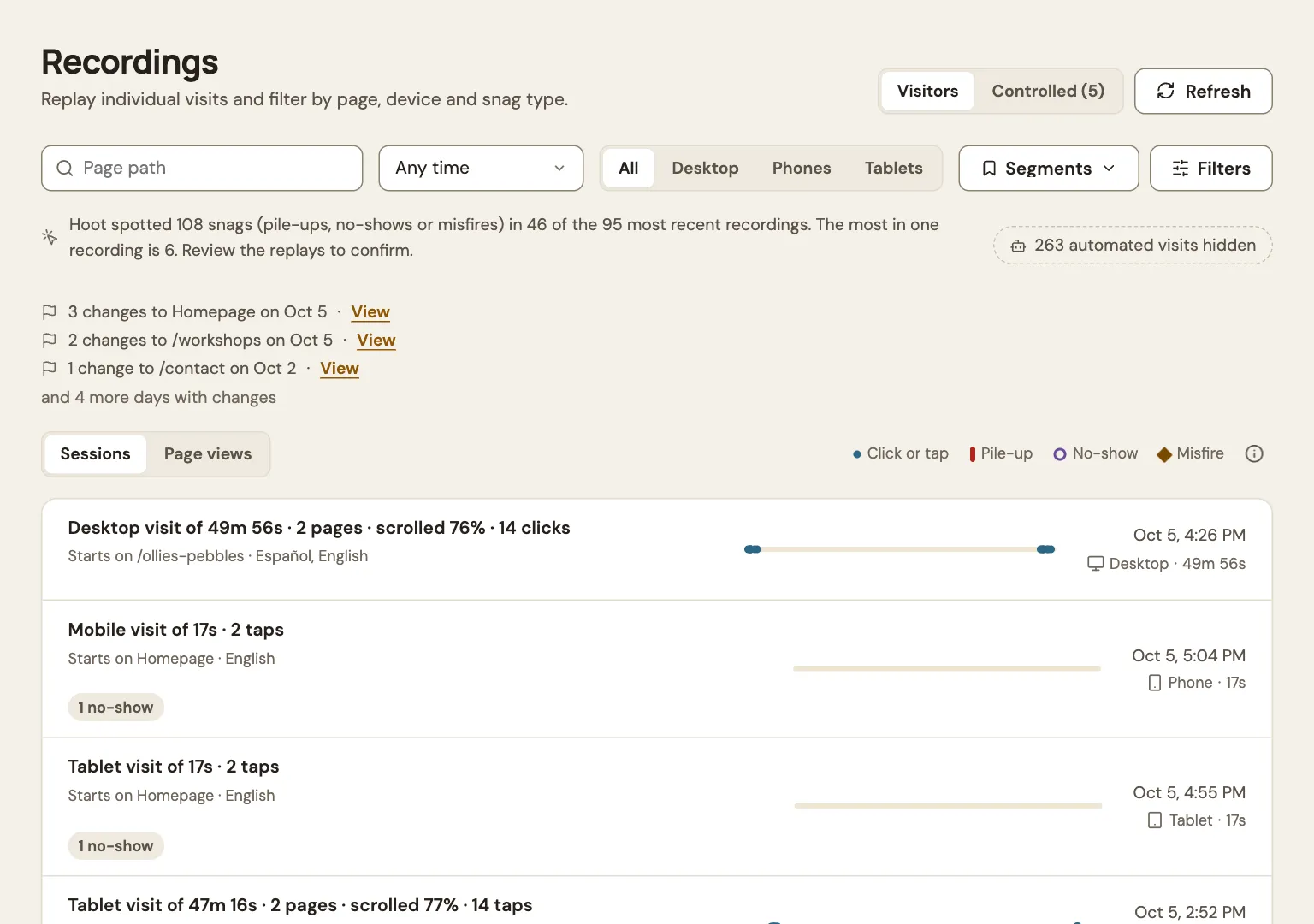
Clicks and scroll, by release
Heatmaps stay separate for each version of your site and each kind of device, so a redesign never muddies the version before it.
Why they stay separate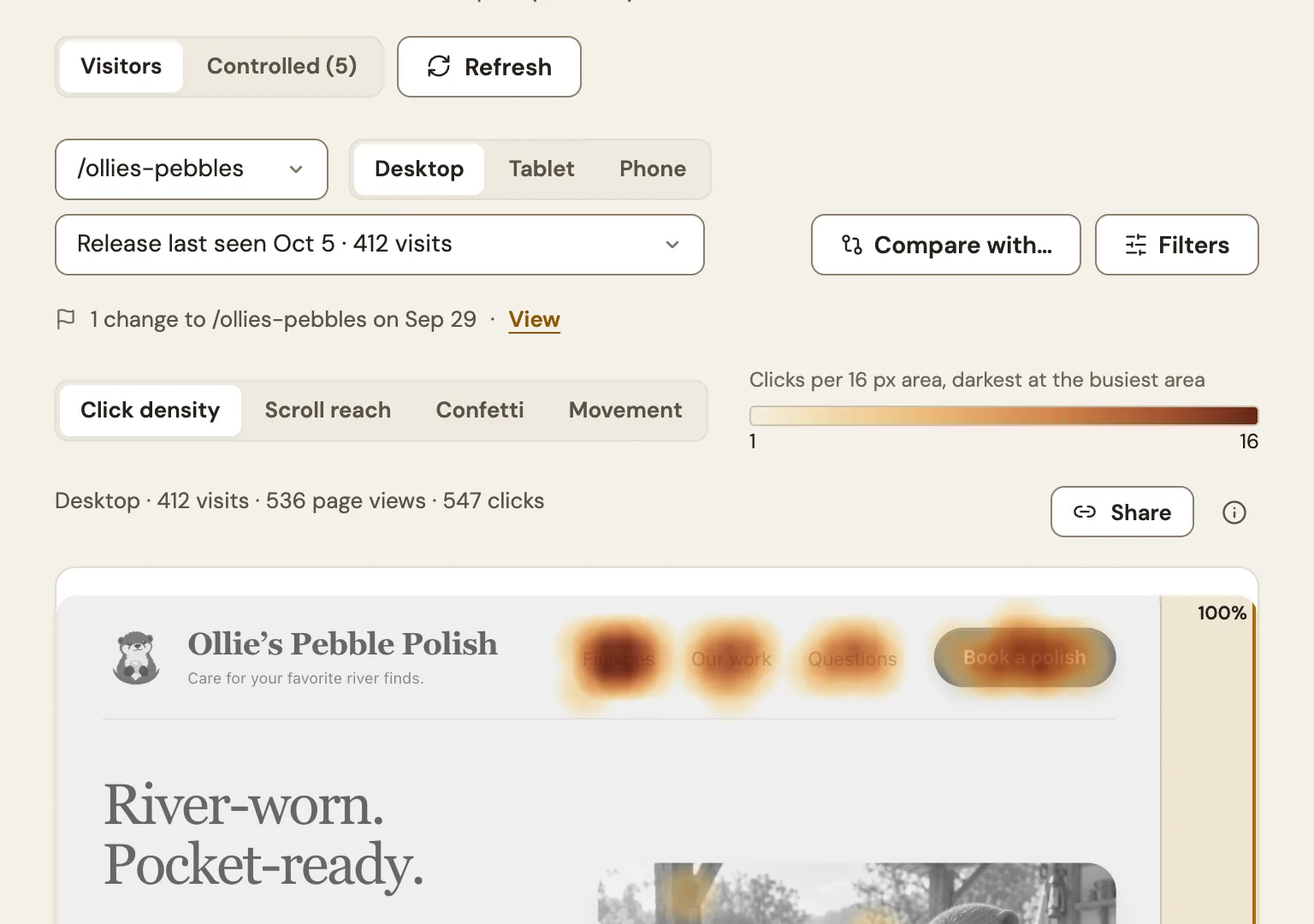
Where visits stop
Put your goals in order and open the replays of the visits that dropped out between two steps.
How funnels work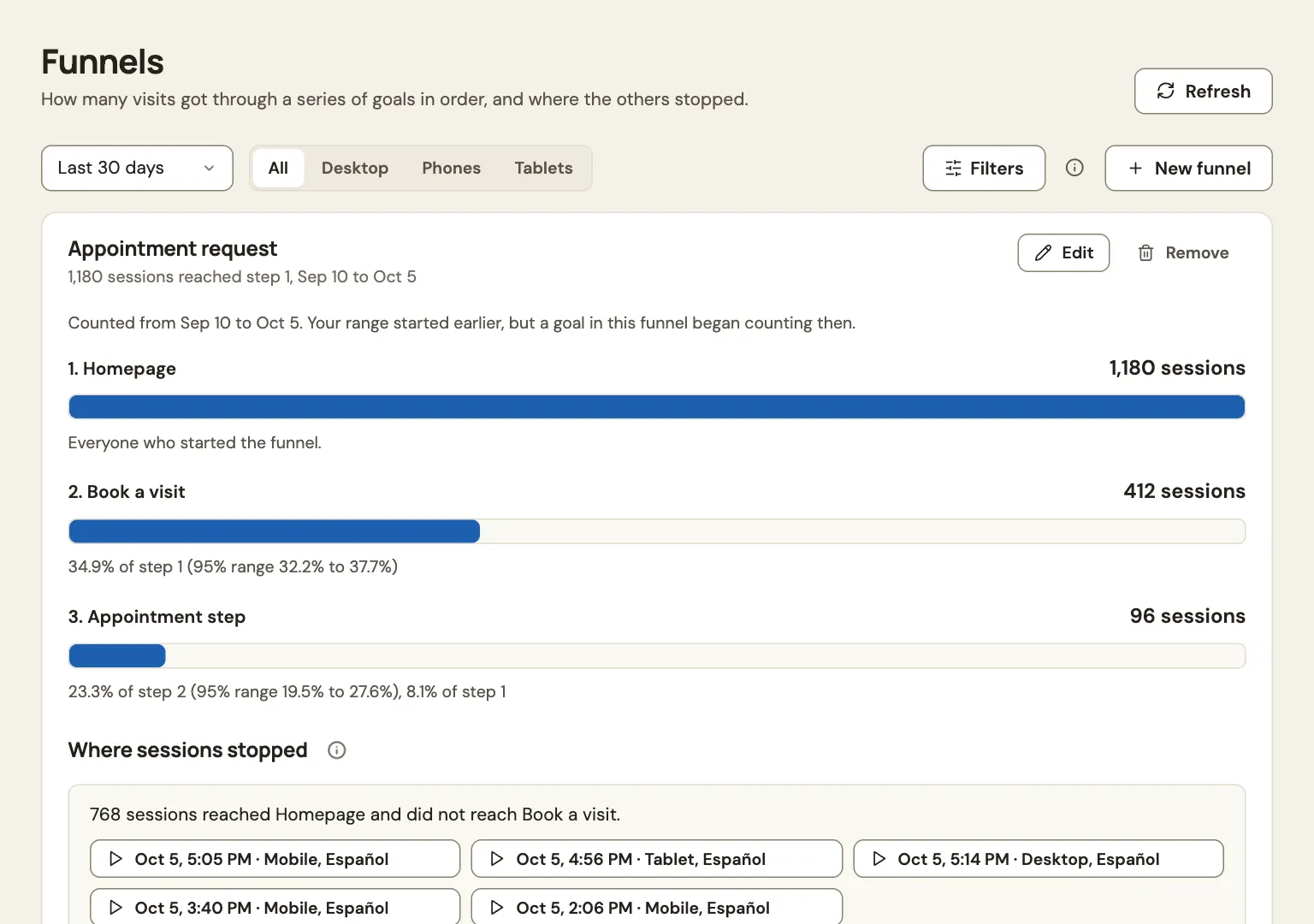
Did it help?
Log a change, then compare conversions and snags before and after. Before and after, not an A/B test.
How to read the verdict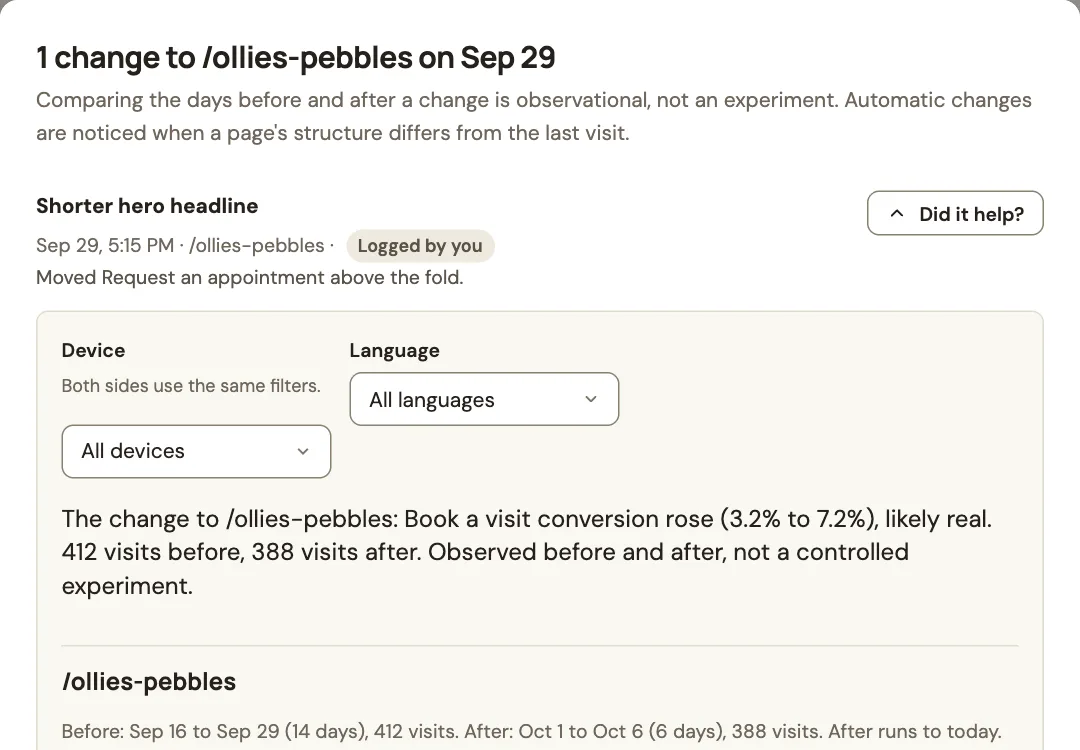
Built for agents
Connect Claude or ChatGPT to Hoot Lens and let it read the evidence.
Sign in with Hoot Lens
Add one connector URL and approve what the assistant can do. No key to paste.
Digests and alerts
A weekly digest, plus alerts when snags spike or a goal drops, arrive by email with links to the evidence.
Evidence in, changes out
Agents read recordings, heatmaps and findings, and log the changes they ship so Did it help? has a before and after.
Set up site access Agents in the FAQ Check agent access
Works with Claude, ChatGPT and other assistants that support remote MCP servers with sign-in.
Connection guide and commands
Connect your agent
Choose your client, connect Hoot Lens, and open your first recorded snag.
Try it with your agent Sample data
Connect your coding agent to a demo server and ask it about Fieldnote, a made-up note-taking app. No sign-in and no account.
Claude Code
claude mcp add --transport http hootlens-demo https://mcp.hootlens.com/demo
Cursor
Add to .cursor/mcp.json
{"mcpServers":{"hootlens-demo":{"url":"https://mcp.hootlens.com/demo"}}}VS Code
code --add-mcp '{"name":"hootlens-demo","type":"http","url":"https://mcp.hootlens.com/demo"}'Then ask
Use the Hoot Lens demo to tell me what is going wrong on the Fieldnote pricing page
Using hootlens-demo, give me this week's summary and show me one replay of a pile-up
The demo serves sample data for a fictional site and is read only. To connect your own site, use the sign-in setup instead. Set up site access
Privacy and trust
What gets recorded is set per site, enforced in the browser and checked again by the collector.
A floor no setting lowers
Passwords, payment and one-time-code fields, and anything you mark data-hoot-private, are never recorded.
Presets per site
Full, Balanced or Strict decides how much text and media a replay can show.
Signals honored
Global Privacy Control and Do Not Track turn capture off for that visitor.
Bots left out
Automated visits are flagged and kept out of your counts.
US data in Google Cloud
Recordings are stored in Google Cloud in the United States.
Retention you control
Choose how long recordings last, up to your plan. A removed recording rejects late data.
Pricing that grows with your traffic
Start on Free. Recorded visits are shared by all the sites on your account.
Free
$0 per month
- 1,000 recorded visits a month
- 1 site
- 7 days of retention
- Just you
- 10 AI explanations a month
Starter
$39 per month
- 10,000 recorded visits a month
- 3 sites
- 30 days of retention
- 5 teammates, plus you
- 100 AI explanations a month
Growth
$99 per month
- 50,000 recorded visits a month
- 10 sites
- 90 days of retention
- 20 teammates, plus you
- 500 AI explanations a month
Pro
$499 per month
- 200,000 recorded visits a month
- Unlimited sites
- 90 days of retention
- 50 teammates, plus you
- 2,000 AI explanations a month
Prices are in US dollars. First-time subscribers get a 14-day trial. Teammates count once across your sites; pending invitations reserve places. Payments run through Stripe, and Hoot Lens never sees your card.
Better questions. Better website decisions.
Practical reads for the moment a chart tells you something changed, but not what to do about it.
Read all articlesCommon questions
Do I need a developer?
No. Paste one line into your site, or follow the guide for your site builder. Everything else, from privacy to which pages are recorded, is set in the workspace.
Read moreWhat is never recorded?
Password, payment and one-time-code fields and data-hoot-private regions. Other typed values stay masked unless you allow them.
Read moreWhich frameworks are verified?
Next.js, React, Vue, Nuxt, SvelteKit, Angular, Astro, WordPress and plain HTML are tested in a browser on every change to the tag and nightly. Shopify and Google Tag Manager are supported, each with its own install guide.
Read moreHow do I connect Claude or ChatGPT?
Add the hosted endpoint as a custom connector and sign in with Hoot Lens. A local server with a token also works.
Read more

See where your visitors get stuck
Free to start. Add one line, and your first visits show up within minutes.